Kids Multiplication Math Games
- 4.7
- Rating
- 10.00M
- Installs
- Free
- Price
 Analysis by App-foxy
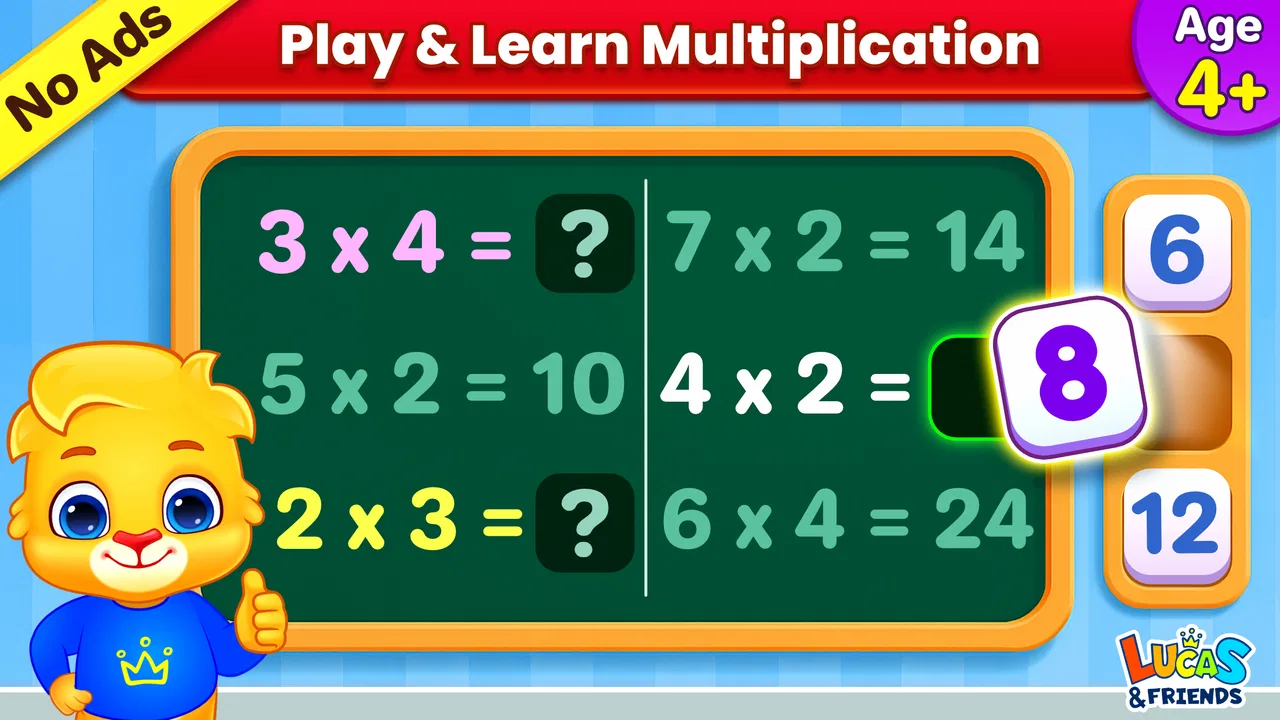
Kids Multiplication Math Games is the kind of educational game I would place on a younger child’s tablet when I want practice to feel less like another worksheet. I found its focus refreshingly narrow: it is built around early maths and multiplication practice rather than trying to become a complete school platform. That makes it easier to understand, but it also means parents should choose it for a specific learning need, not as a replacement for broader teaching.
Developed by RV AppStudios, the game is free and rated for Everyone. It belongs to the educational game category, and its audience is clearly preschool and early-learning children who benefit from short, repeated activities. The current version is 1.8.0, and it works on devices running Android 6.0 or later. Those details matter because the game is aimed at families who may be using an older hand-me-down phone or tablet rather than a new premium device.
My overall impression is positive, especially for a child who needs gentle repetition. The experience is straightforward enough for a young learner to approach with limited help, while the maths focus gives parents a clear reason to return to it. Still, I would not hand it to every child and assume it will automatically teach multiplication well. Its value depends on how it is used, how much guidance the child needs, and whether the child is ready for this particular level of practice.
You May Also Like

 Blood Strike: 2.5 Anniversary
Blood Strike’s Loadouts Turn Every Drop Into a Tactical Gamble
A close look at Blood Strike’s custom loadouts: how fast access to signature weapons reshapes its battle royale rhythm, rewards preparation, and narrows the gap between fights.

 Pandora - Music & Podcasts
Pandora’s Music Is Easy to Start, but Harder to Recover
Pandora’s strength is its low-effort path from a seed to a station. Its weak spot is how much confidence it asks you to place in connection, setup, and quiet recovery.

 8 Ball Pool
 Is Built on Rivalries, Rematches, and Routine
A close look at the rivalries, rematches, shared routines, and unanswered safety questions that turn a quick pool match into a persistent mobile community.

 Samsung Music
’s Quiet Strength Is Playing What You Already Own
Its reach comes less from spectacle than from dependable access to a personal library. That simplicity is both the app’s strongest retention engine and its ceiling.

 AccuWeather: Weather Radar
AccuWeather Review: A Quick, Clear Forecast for Everyday Decisions
For everyday plans, the best forecast is the one you can understand quickly. AccuWeather makes rain timing, radar, and local conditions easy to act on, with a few trade-offs.

 Hill Climb Racing
Why Hill Climb Racing Still Turns Crashes Into One More Run
A tiny car, a bumpy hill and one more upgrade: Hill Climb Racing keeps resurfacing because its simple chaos makes every near-miss feel personal.
More From Our News Desk



How the game feels during everyday use
I find that everyday use is shaped less by the game’s educational label than by whether a child can settle into a brief round without an adult turning it into a lesson. I’d keep the device nearby and use the first few attempts to notice when the child is engaged, confused, or ready to stop. That simple observation makes it easier to judge the game’s feedback rhythm and what kind of encouragement helps.
Speed expectations for a child’s short practice session
What I like most about this type of game is that it does not ask a young child to navigate a complicated learning system before reaching the maths. The shorter the path from opening the game to beginning an activity, the less likely a child is to lose interest. In my experience, that simplicity is more important for preschoolers than a long list of educational tools.
The game’s focused purpose also helps it feel lighter than a large all-in-one learning app. A broad platform may include reading, drawing, science, stories, progress dashboards, and several account areas. That variety can be useful, but it can also create distractions. Here, the central task remains maths practice, so a parent can use it for a quick round while waiting at a clinic, during a quiet afternoon, or before moving on to another activity.
I would treat it as a short-session game rather than something a child should play continuously. Multiplication practice can become tiring when a learner is still building confidence, and speed alone is not the same as understanding. My preferred approach is to let the child complete a small amount, then ask them to explain one answer aloud. That turns a tap-based activity into a chance to check whether they are recognizing the idea or merely guessing.
The best performance habit is to keep sessions brief and purposeful. If a child starts rushing, tapping randomly, or becoming frustrated, I would stop rather than push through. The game can provide repetition, but an adult still needs to notice whether the child is learning, memorizing patterns, or simply trying to finish.
What happens during heavier use
A realistic family scenario would be a parent giving the game to a child while preparing dinner. The child may play independently for a few minutes, then ask for help after meeting a question that feels difficult. In that situation, the useful part is not only whether the app keeps running; it is whether the child can return attention to the maths after a mistake. I would stay close enough to encourage the child, but avoid answering every question immediately.
Another practical use is a short warm-up before homework. A child who has recently learned multiplication may use the game to recall basic facts before working on written exercises. That can make the transition into schoolwork smoother. However, I would not use it as a substitute for writing calculations, solving word problems, or explaining a method. A child can become quick at recognizing familiar prompts without becoming comfortable with the broader reasoning that school maths requires.
During repeated play, the main resource demand is likely to come from the device’s general condition rather than from the educational purpose itself. Older tablets often slow down because of limited free storage, many background apps, or an aging battery. I would close unused apps and restart a particularly tired device before blaming this game for sluggish behavior. That is a practical step for parents using older hardware and costs nothing.
Heavy use also exposes a design trade-off. Repetition is useful for memorizing multiplication facts, but too much repetition can feel mechanical. If the child is no longer thinking, I would alternate the game with physical objects, flash cards, or spoken questions. The app works best as one part of a routine, not as the entire routine.
Reliability and recovering from interruptions
For a children’s game, reliability has a special meaning. A young player may not understand why an activity stops, why a screen changes, or why a device needs attention. I therefore value a simple recovery path more than advanced options. If a session is interrupted by a phone call, a low-battery warning, or an accidental exit, I would expect the parent to reopen the game and begin again without treating the interruption as a serious problem.
I cannot promise identical behavior on every Android device, because devices differ widely in age, screen size, available storage, and system condition. The sensible test is personal: install it on the child’s actual device, open several activities, rotate or lock the screen only if the child normally does so, and observe whether returning to the game feels manageable. This is more useful than assuming a general result from a newer phone.
Recovery is also about the child’s emotional response. If a child loses a round after an interruption, I would frame it as a fresh attempt rather than a failure. Keeping the tone calm matters because the goal is practice. A small pause can even be helpful: the child can explain the previous question before continuing, which gives the parent a quick view of their understanding.
The game has been available since April 1, 2019, and its current version is 1.8.0. That gives it a longer presence than a newly released experiment, while the version number is a reminder that parents should keep normal expectations about updates and device compatibility. I would install it, test it personally, and make sure the child can use it comfortably before relying on it during a trip or another moment when help is not nearby.
Device constraints parents should consider
The minimum operating system is Android 6.0, so families with very old Android hardware should check compatibility before planning around the game. A compatible operating system does not guarantee an ideal experience, though. A device with a small display, an unreliable touch screen, or a battery that drains quickly may make a simple children’s game frustrating even when installation is possible.
Screen size is particularly important for preschool use. Young children can miss small touch targets, especially if they are still developing fine motor control. I would prefer a tablet with enough room for the child to see the question and answer choices clearly, while keeping the device close enough that an adult can monitor the session. A large screen is not automatically better if it encourages the child to hold the device awkwardly, so comfort matters too.
Storage and background activity are practical concerns as well. Before installing any children’s app, I usually remove unused downloads, close unnecessary apps, and check that the device is not already struggling. This is not a special requirement of this game; it is simply good preparation for older Android hardware. A clean, well-maintained device gives a more honest impression of how smoothly the game fits into everyday use.
Parents should also think about supervision and the child’s ability to read instructions. The Everyone age rating makes the game suitable for a broad audience, but age suitability is not the same as independent readiness. A preschooler may still need an adult to explain what a question is asking, especially if the child is learning multiplication for the first time. I would introduce the game together, demonstrate one round, and then see how much the child can manage alone.
Where it fits among usual alternatives
Compared with paper worksheets, the game is more inviting for a child who resists written practice. Immediate interaction can make repetition feel lighter, and the game format may encourage a learner to try again after a mistake. Worksheets remain better for handwriting, showing working, and giving a teacher something concrete to review. I would use both, assigning each a different job.
Compared with a broad children’s learning suite, this game’s narrower maths focus is an advantage when the family wants a quick multiplication activity. A larger suite may be the better choice for a child who needs reading, counting, shapes, and other subjects in one place. The trade-off is that broad apps can make it harder to identify whether the child is actually practicing the target skill or simply moving between entertaining sections.
Compared with a tutor or a parent-led lesson, the game offers convenience but not the same adaptability. A person can change the explanation, use objects, slow down, or connect multiplication to real life. The app can repeat practice more patiently than a busy adult, but it cannot replace the judgment of someone who notices confusion. For that reason, I see it as a practice companion rather than a teacher.
Compared with traditional flash cards, the game may feel more motivating for children who enjoy screens, while flash cards are easier to use anywhere and do not depend on a device. Flash cards also make it simple to pause and ask, “How did you work that out?” My choice would depend on the child: the game for engagement and routine, cards for quick review away from a screen.
Three practical ways to get more from it
Use the game as a diagnostic conversation starter. When the child answers confidently, ask them to create a matching example with toys, blocks, or snacks. If they cannot explain the relationship, the adult has learned that more concrete practice is needed.
Pair screen practice with a stopping rule. Instead of allowing unlimited play, decide in advance that the child will complete a short activity and then tell you one multiplication fact. This prevents the game from becoming background entertainment and makes the learning goal visible.
Use mistakes to separate memory from understanding. If the child misses an answer, avoid immediately supplying it. Ask them to group objects or count equal sets. This takes advantage of the game’s prompt while adding the hands-on reasoning the screen cannot provide by itself.
These approaches are more useful than simply measuring how long the child plays. A longer session may show enthusiasm, but it does not necessarily show progress. I would watch for calmer answers, better explanations, and less dependence on guessing. Those are stronger signs that the practice is helping.
Who should choose it, and who should skip it?
I would recommend Kids Multiplication Math Games to parents looking for a free, focused way to add maths practice to a young child’s routine. The game is especially suitable when the child enjoys interactive learning, needs repeated exposure to multiplication, and can use an Android device running 6.0 or later. Its broad Everyone rating also makes it a comfortable option for family use, provided an adult chooses an appropriate level of support.
I would be more cautious if the child is not ready for multiplication yet, finds screen activities overstimulating, or needs detailed explanations after every question. In those cases, physical counters, picture-based lessons, or direct teaching may work better first. I would also skip it as the main solution for an older learner who needs fractions, algebra, written methods, or complex problem solving. The focused design that helps beginners can feel limited once the child’s maths needs become broader.
The game has reached over ten million installs and holds a 4.5 average from roughly twenty-four thousand ratings, which suggests that it has found a substantial audience. I take that as useful context rather than a guarantee. Popularity cannot tell me whether it matches one particular child’s learning style, and a high average does not remove the need for supervision or device testing.
My performance verdict
After considering speed, heavier-use situations, reliability, and older-device constraints, I see this as a practical lightweight choice for focused practice. Its strongest quality is not complexity; it is the clear connection between a young child’s short game session and a specific maths goal. The free price makes it easy to try without committing to a subscription, and the narrow purpose helps parents decide when to use it.
My main reservation is that a simple multiplication game can only do so much. It may support recall, but it should sit beside conversation, physical examples, written work, and real-life problem solving. Parents should also prepare the device properly and test the experience before leaving a child to use it independently. Those small steps make the difference between a useful practice tool and a frustrating screen session.
I would recommend it as a short, supervised maths companion rather than a complete learning program. For a preschooler or early learner who needs friendly repetition and uses a compatible Android device, it is worth trying. For children who need wider subjects, deeper explanations, or less screen time, a worksheet, flash-card routine, or human-led lesson may be the better primary option. In my view, the game earns its place when it is used deliberately: a few focused minutes, a little discussion afterward, and a clear understanding that playing is supporting learning rather than replacing it.
FAQs for Kids Multiplication Math Games
01What age group is Kids Multiplication Math Games suitable for?
Kids Multiplication Math Games is designed for children aged 6 to 12. It focuses on enhancing multiplication skills in a fun and interactive way. The app includes various levels that cater to different skill sets, making it suitable for early learners as well as those needing more advanced practice.
02Is Kids Multiplication Math Games available on both Android and iOS?
Yes, Kids Multiplication Math Games is available for download on both Android and iOS platforms. You can find it in the Google Play Store for Android devices and the Apple App Store for iOS devices. Ensure your device meets the minimum system requirements before downloading.
03Are there in-app purchases or ads in Kids Multiplication Math Games?
The app offers a free version that includes ads. For an ad-free experience, you can opt for in-app purchases, which also unlock additional features and levels. This model allows users to try the app at no cost and decide if they want to invest in the premium version.
04How does Kids Multiplication Math Games help improve math skills?
The app uses a variety of engaging games and challenges to reinforce multiplication skills. It includes timed quizzes, interactive puzzles, and rewards to motivate children. By providing instant feedback and progressive difficulty levels, it ensures a comprehensive learning experience tailored to each child's pace.
05Is parental control available in Kids Multiplication Math Games?
Yes, the app includes parental control features. Parents can track their child's progress and adjust difficulty levels accordingly. Additionally, settings can be configured to limit screen time, ensuring a balanced approach to learning and play. This helps parents stay engaged with their child's educational journey.
Pros
- Engaging and interactive design.
- Adaptive difficulty levels.
- No in-app ads for distraction-free play.
- Supports offline learning.
- Colorful graphics appeal to kids.
Cons
- Limited to multiplication only.
- No multiplayer mode.
- Requires space for installation.
- No parental control features.
- May not suit older kids.

Kids Multiplication Math Games
Gallery